|
|
|
| Who would benefit from this training
program? 1. Users who are totally new to Excel and/or spreadsheets. |
| Education and
knowledge in today's fast pace, high-tech world is now more important than
ever before, especially during these tough economic times of "company
down sizings, furloughs, and
lay-offs." However, computer and
other business related classes can be very expensive and very time
consuming. One alternative to the traditional sit down class is
training software. With our training program you can learn about how
to efficiently use Excel 2007, 2010, and 2013 to remain competitive right from the convenience of your own home or office,
at a pace you set.
Over the last several decades, computers have greatly changed the way we do things in our everyday lives. They have added convenience to our daily tasks, have enhanced our education, and have provided us with many convenient office tools. Trends in education and the job market over the last ten years indicate that those who have strong computer skills will remain competitive and keep working. This is especially true during tough economic times! Those without strong computer skills will find themselves struggling and maybe even out of a job. Unfortunately, many jobs that went away when the economy crashed in 2008 will not be back (Even in a Recovery, Some Jobs Won't Return - Wall Street Journal). Thus, computer education is now more important than ever before! One program which is currently in high demand in the job market is Microsoft Excel. Excel is a program used to create spreadsheets. A spreadsheet is a computer program designed to facilitate the manipulation of data in the form of numbers. It will save you lots of time and improve accuracy when calculating equations with many variables. With a spreadsheet you can easily produce projections, budgets, salary expenses, tax reports, proposals, charts, and much more! No wonder there is so much need for this program at school, work, and home. |
View Our
Program Video
|
In January of 2007, Microsoft released Excel 2007. Like all the other programs that make up the Office 2007 Suite, Excel 2007 looks extremely different from the previous versions. Gone are the traditional Menu Bar and toolbars we have all become accustomed with over the years. They have been replaced with the Office Button, Ribbon, and Quick Access Toolbar. This new environment has been carried over to the Office 2010 and 2013 programs. Learn the 2007 environment and the transition to 2010 or 2013 will be extremely minor! Learn 2010 or 2013 and you can work with 2007 with no problem!

Excel 2007 Environment (Office Button, Ribbon, and Quick Access Toolbar)

Excel 2010/2013 Environment (File Button (Tab), Ribbon, and Quick Access Toolbar)
As professional computer consultants who regularly train students at all different usage levels, we at Coronel Data Processing fully understand that new Excel users need a training program that can quickly teach them the basics of working with a spreadsheet, while experience Excel users need a program to help them become familiar with the new Excel environments. We also understand that while sitting hours in a classroom and going one-on-one with a qualified instructor to learn Excel would be ideal, few people in reality have the time and money. Thus, we have developed an educational computer program called "The Electronic Excel Tutor™ - Office 2007-2013 Basics." This is an interactive computer program that can have you up and running with the latest Excel versions in six to ten hours. You go at your own pace, at your convenience - all on your computer.
We have taken much of our 20 plus years of
consulting and training experience and placed it
into The Electronic Excel Tutor™ - Office 2007-2013
Basics. For our clients, we have designed countless spreadsheets,
templates, and other Excel solutions. Since 1996, we have trained
thousands of students which has led to the development
a PROVEN computer training method, which consists of a
THREE PRONG ATTACK that you will see demonstrated throughout this program.
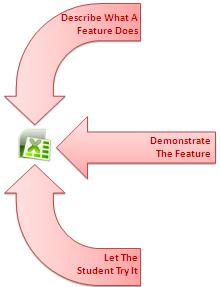
This method can be summarized as:
1) Describe to the student what a feature does
2) Demonstrate the feature to the student
3) Let the student try it
Our program can help you learn what Excel 2007, 2010, and 2013 are all about. We cut through all the fat and give you the meat! Very little filler used here! Our program has a remarkably simple to use point and click user-interface that makes learning Excel easy.
One training solution that has recently become very popular over the last several years are training videos. You find them on YouTube and on many other sites. This solution has been implemented in our program as demos. While training videos are a great source of information and certainly have their place in the learning environment, they ALONE do not allow you to customize a training plan to MAXIMIZE LEARNING and EASILY TAKE NOTES FOR LONG TERM RETENTION. Thus, we have added a "Course Map" option designed to help users go through the program more easily and an option to create a notes sheet of things that pertain directly to you. Each key screen in the program has a checkbox that can be marked when that section of the program has been completed. All checkmarks then appear on the Course Map screen next to their respective topic so you know what parts of the program you have already completed. In addition, there is an option on each key screen to create and edit your own personalized notes sheet.
Lesson Topics in The Electronic Excel Tutor - Office 2007-2013 Basics
| Lesson 1 -
Getting Started 1. Launching the Program 2. The Excel Environment 3. Navigating 4. Saving A Workbook 5. Closing A Workbook 6. Opening A Workbook Lesson 2 - Creating A Basic Worksheet 1. Creating A New Workbook 2. Entering Text And Values 3. Creating Basic Formulas 4. Using Functions In Formulas 5. Using The AutoSum Tool 6. Insert Function Dialog Box 7. Absolute References Lesson 3 - Modifying A Worksheet 1. Selecting A Range Of Cells 2. Edit The Entry In A Cell 3. Removing A Cell Entry 4. Renaming A Worksheet 5. Insert Or Delete A Worksheet 6. Moving Or Copying Worksheets 7. Inserting Rows, Columns, And Cells 8. Deleting Rows, Columns, And Cells 9. Undo/Redo 10. Moving And Copying |
Lesson 4 -
Formatting 1. Adjusting Column/Row Sizes 2. Fonts 3. Standard Styles 4. Format Painter 5. Alignment 6. Number Formatting 7. Formatting With Borders 8. Fill Color 9. Font Color 10. Additional Format Options Lesson 5 - Printing 1. Print Preview 2. Page Break Preview 3. Page Setup 4. Print Dialog Box Lesson 6 - Charts 1. Creating Charts 2. Editing Charts 3. Printing Charts Lesson 7 - VLOOKUPs 1. What Is A VLOOKUP? 2. Excel Tables 3. Creating VLOOKUPs |
Lesson 8 - PivotTables 1. What Is A PivotTable? 2. Creating A PivotTable 3. Working With A PivotTable |
Ask yourself,
"Can you afford not to stay on top of the latest technology during these tough economic times?"
Order Your Copy Of The Electronic Excel Tutor - Office 2007-2013 Basics Today
We are so confident that you will be happy with our software program, that it is backed up by our "7-day Money Back Guarantee." If you are not satisfied with our program within seven days of receiving it, let us know why and we will refund your fee, and you can keep the software.
Minimum Computer
Requirements
*Windows 98 / ME / 2000 / XP / Vista / Windows 7 / Windows 8
*15 MB Free Disk Space
*512 RAM (1GB or greater recommended)
*DVD CD ROM
*1024 X 768 screen resolution or greater recommended
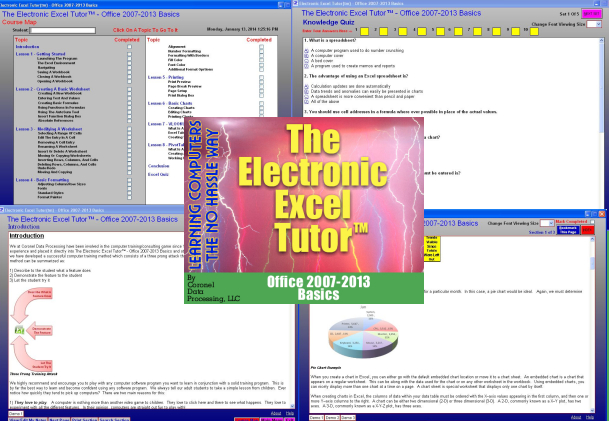
Click a sample below to see what our program looks like


|
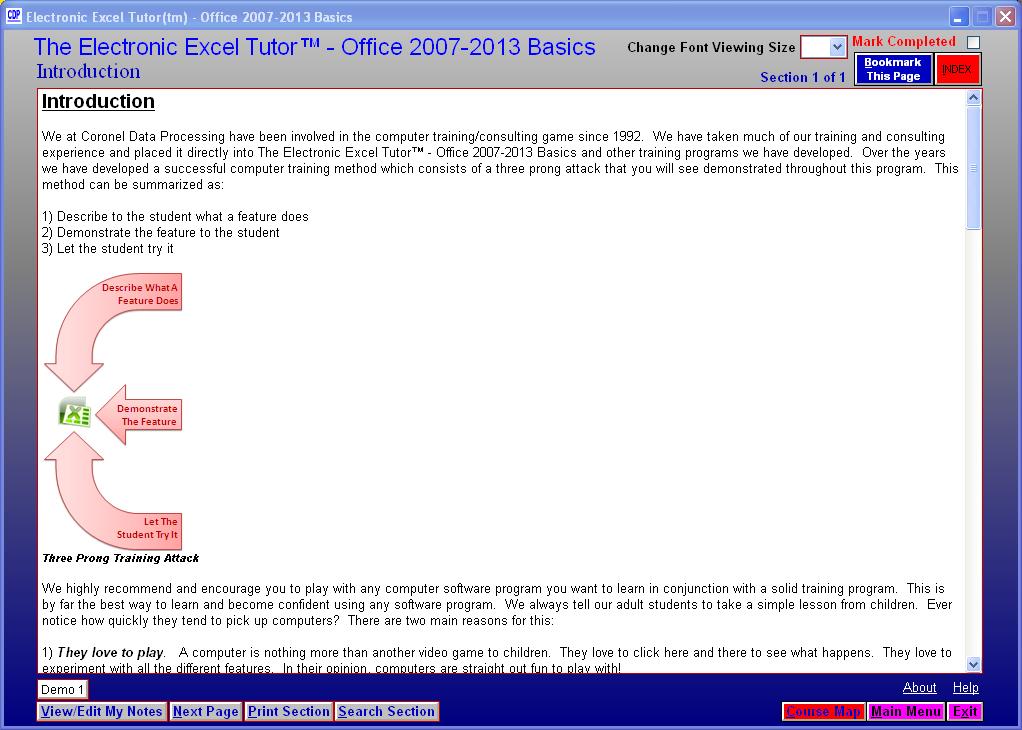
Introduction Screen
View Our Program Video On Youtube
Click Here To Order The Electronic Excel Tutor - Office 2007-2013 Basics On-line Today
|
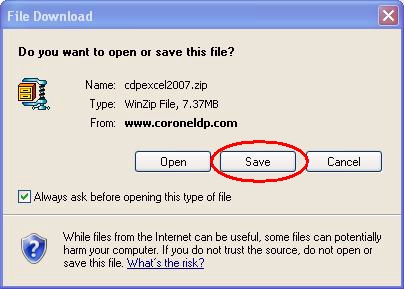
Click Here To Download A FREE Demo Of Our Program Use the Save option to save the
file to your computer. Once you download the file click the Open option. Depending on your system, you may have to use an unzipping program such as WINZIP to extract the setup file or you can access the setup file directly. Either way, run the SETUP.EXE to install the program. To access the downloaded file later on, go to the location you downloaded the file to (e.g., C:\AOL9\DOWNLOAD) and double click the file. Go with the default settings and the program will be installed into a folder called C:\CDP\Excel 2007-2013 Tutor Demo. To run the program, click START-PROGRAMS-CDP-Excel Tutor 2007-2013 Demo or switch to the C:\CDP\Excel 2007-2013 folder, and run the Excel Tutor 2007-2013 Demo.exe program.
|
 |
CDP Coronel Data Processing, LLC
The Computer
Specialist
23535 Palomino Dr., #253
Copyright © 1996-2018
Coronel Data Processing, LLC
All Rights Reserved